BITZER Electronics ServiceTool
無料
2.21.31588for iPhone, iPad
Age Rating
BITZER Electronics ServiceTool スクリーンショット
About BITZER Electronics ServiceTool
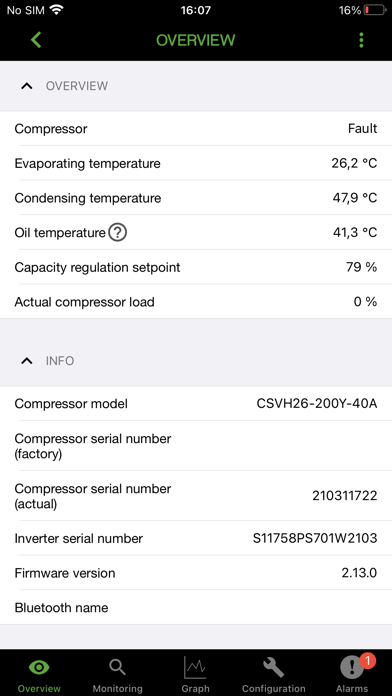
This is the App edition of the BEST SOFTWARE (BITZER Electronics Service Tool) for connecting to BITZER IQ products that support Bluetooth. Quickly configure the devices, monitor the operation and view the alarms including alarm help texts. Furthermore, the logs can be retrieved from the devices, visualized and uploaded to the myBITZERcloud for storage and sharing with other devices and peoples.
Supported products:
// IQ MODULE CM-RC-02
// IQ MODULE CM-RC-01
- Requires firmware version 2.5.246.00 or newer
- For firmware update use the Windows version of BEST as it requires to connect via the BEST converter
// IQ MODULE CM-SW-01
- Requires firmware version 2.8.82.00 or newer
- For firmware update use the Windows version of BEST as it requires to connect via the BEST converter
// CSV
- Bluetooth is available by the CSV frequency inverters with the control board of the 2nd generation. This control board can be recognized by the STO input (orange connector) or the RJ12 socket for the BEST converter
- Requires firmware version 1.92 or newer
- For first configuration (change of refrigerant or configuring the compressor type in case of spare parts) use the Windows version of BEST as it requires to connect via the BEST converter. Also for firmware updates
// ECOSTAR LHV5E and LHV7E
- Requires firmware version 5.0.2.0 or newer
- For firmware update use the Windows version of BEST

Supported products:
// IQ MODULE CM-RC-02
// IQ MODULE CM-RC-01
- Requires firmware version 2.5.246.00 or newer
- For firmware update use the Windows version of BEST as it requires to connect via the BEST converter
// IQ MODULE CM-SW-01
- Requires firmware version 2.8.82.00 or newer
- For firmware update use the Windows version of BEST as it requires to connect via the BEST converter
// CSV
- Bluetooth is available by the CSV frequency inverters with the control board of the 2nd generation. This control board can be recognized by the STO input (orange connector) or the RJ12 socket for the BEST converter
- Requires firmware version 1.92 or newer
- For first configuration (change of refrigerant or configuring the compressor type in case of spare parts) use the Windows version of BEST as it requires to connect via the BEST converter. Also for firmware updates
// ECOSTAR LHV5E and LHV7E
- Requires firmware version 5.0.2.0 or newer
- For firmware update use the Windows version of BEST
Show More
最新バージョン 2.21.31588 の更新情報
Last updated on 2025年10月06日
旧バージョン
Relevant innovations in versions 2.21
• Product data updated in correspondence with BEST 2.21 for Windows. For details about the newly supported products, compressors and refrigerants see http://best.bitzer.tech/.
Show More
Version History
2.21.31588
2025年10月06日
Relevant innovations in versions 2.21
• Product data updated in correspondence with BEST 2.21 for Windows. For details about the newly supported products, compressors and refrigerants see http://best.bitzer.tech/.
BITZER Electronics ServiceTool FAQ
ここをクリック!地理的に制限されているアプリのダウンロード方法をご参考ください。
次のリストをチェックして、BITZER Electronics ServiceToolの最低システム要件をご確認ください。
iPhone
iPad